Speed to Lead: How to Measure and Improve it
Speed to Lead: How to Measure and Improve It
A new lead fills out the form on your website at 7:40 on a Tuesday night. Maybe they phone first, reach voicemail and hang up without leaving a message. By the time someone on your team sees the inquiry the next morning, that prospect has already contacted two of your competitors, and one of them answered.
That gap between "I'm interested" and "we're on it" is what speed to lead measures. Most service businesses never track it, and the leads they lose this way don't show up in any report. This guide explains what speed to lead is, how to measure your lead response time honestly, why most businesses are slower than they think, and how to automate the first reply without sounding like a robot.
What Is Speed to Lead?
Speed to lead is the time it takes your business to make meaningful contact with a new lead after they raise their hand. The clock starts when the potential customer acts: submits a form, rings your office, sends a chat message, replies to an ad or messages your business number. It stops when your business responds.
You'll also hear it called lead response time or speed to contact. People use the terms interchangeably, and that's fine in conversation. For measurement, the part that matters is defining exactly what counts as a "response" (more on that below).
The importance of speed to lead isn't limited to big B2B companies with a room full of sales reps. For a home service company, a clinic, a law office or any business where the customer is comparing options right now, it often decides who gets the job.
Why Speed to Lead Matters
When someone reaches out, they're thinking about their problem at that moment. Every minute that passes, they get busy, forget which company they contacted, or get an answer from someone else.
The most-cited research on this comes from a 2011 Harvard Business Review article, "The Short Life of Online Sales Leads," by James B. Oldroyd, Kristina McElheran and David Elkington. Studying 1.25 million sales leads, the authors found that firms that tried to contact a potential customer within an hour of an inquiry were nearly seven times as likely to qualify the lead (have a meaningful conversation with a decision maker) as firms that waited even an hour longer (HBR, March 2011). The study is more than a decade old, and buyers' expectations have only gotten faster since then, so treat it as a floor, not a ceiling.
A faster response affects more than the first conversation:
●Contact rates. A prospect who just asked a question is far easier to reach than one who asked yesterday.
●Lead quality and lead conversion. Quick replies catch people while their need is real and specific, which tends to lift your conversion rate. Slow replies tend to find people who have already solved the problem.
●Ad spend. If you pay for clicks or leads, slow follow-up wastes money you've already spent. Fixing response time is often cheaper than buying more leads.
How to Measure Lead Response Time
Most businesses have never measured this at all. Here's a simple way to start.
1. Define the start and stop events
The start is the moment the lead becomes available to you: the form submission timestamp, the time of a missed phone inquiry, or the first chat message. The stop is the first response that counts. Write both definitions down so everyone measures the same thing.
2. Track more than one clock
A single number hides a lot. It helps to track four separate moments:
1.Acknowledgement: the person gets confirmation that you received their inquiry (an automatic message or email, for example).
2.First attempt: someone (or something) tries to actually help, with a phone conversation, a personal message or a qualifying question.
3.First conversation: a real two-way exchange happens.
4.Next step: an appointment is booked, a quote is scheduled, or the lead is clearly disqualified.
Automated lead follow-up can make the first clock nearly instant. The other three tell you whether that quick acknowledgement turned into anything.
3. Use the median, not the average
One lead that waited three days can drag an average way up, and a burst of instant auto-replies can drag it way down. The median, plus the share of leads that waited longer than your target, gives you a truer picture.
4. Break it down by channel and time of day
Phone inquiries, web forms, chat, social messages and ad leads usually have very different response times, and so do business hours and after hours. Daytime phone inquiries may get answered quickly while weekend form fills sit for a day and a half. Tag each inquiry with its lead source so you can see the difference.
5. Run a quick audit
If your software doesn't report this yet, test it yourself. Submit your own website form at different times of day, ring your main line after hours, and message your Facebook page. Write down how long each one takes to get a reply, and what that reply says. It shows you where to improve response times first.
Does an automated reply count as first contact?
It depends on what the reply does. An automatic message that says "Thanks, we got your message" is an acknowledgement. It tells the person they aren't being ignored, which matters. But it doesn't answer their question or move them forward, so don't let it stop your main clock.
An automated reply that actually helps is different: it answers the question, asks a qualifying question, or lets them book a time. A well-trained AI chat or voice agent having a real conversation can reasonably count as first contact. The test is simple: did the person get something useful, or just a receipt?
Why Most Businesses Respond Slowly
Slow response is rarely laziness. It's usually a lead management problem:
●Leads arrive in too many places. Form emails go to one inbox, phone inquiries to a cell phone, Facebook messages to whoever manages the page, and chat to an app nobody checks.
●No one clearly owns the lead. Without clear lead assignment, everyone assumes someone else took it.
●The people who could respond are busy doing the work. In a service business, the owner or technician who answers the phone is often on a job, with a patient or in a meeting.
●After hours and weekends are blind spots. Many inquiries come in when the office is closed, and they wait until Monday.
●Missed calls disappear. Many people hang up without leaving a voicemail, so the business never knows they tried.
●Nothing is measured. Without a number, nobody notices the problem until revenue drops.
How to Improve Your Speed to Lead in 7 Steps
These steps work whether one person handles inquiries or a full sales team does. Start with the first two.
Step 1: Put all your lead capture in one CRM
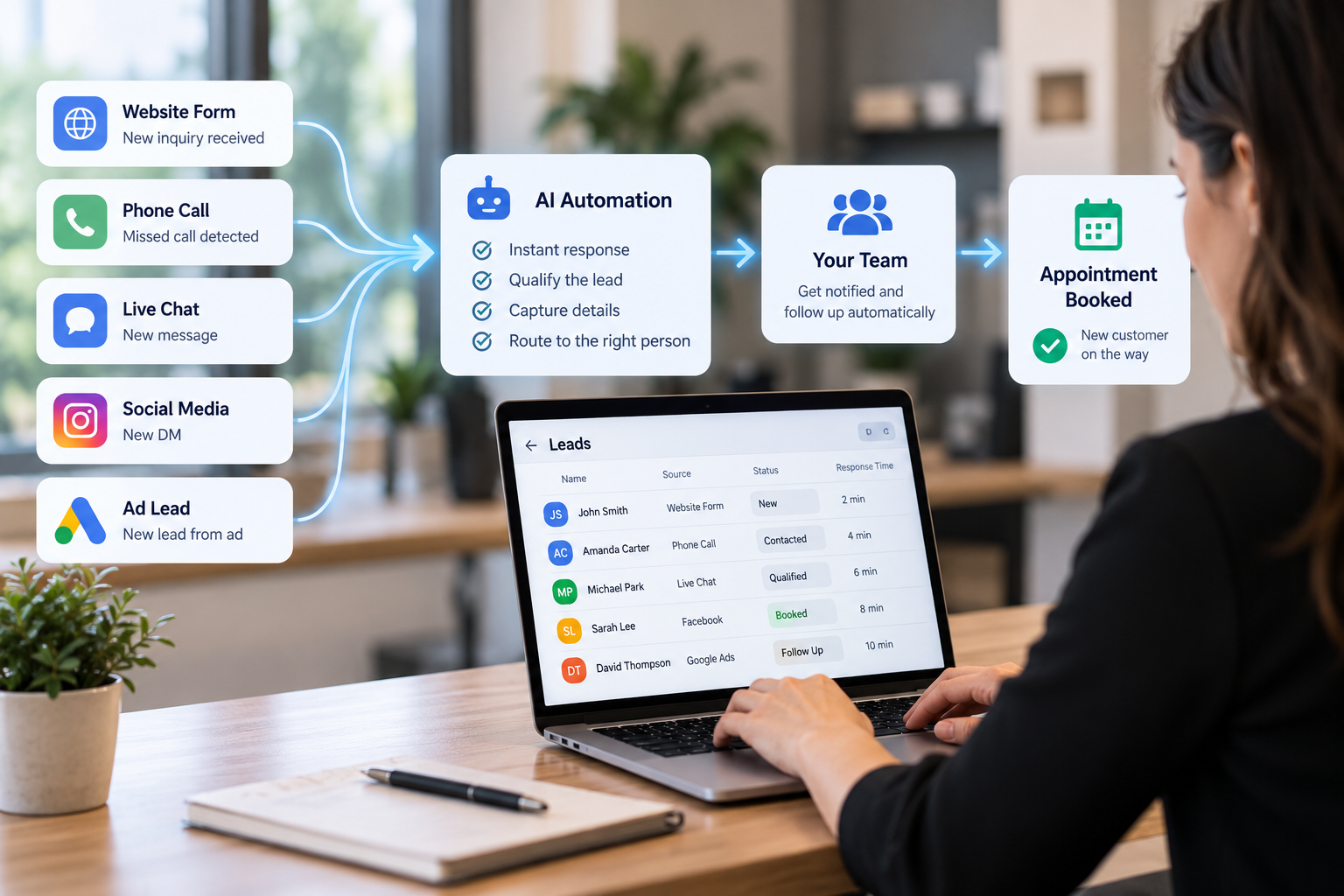
Speed starts with visibility. Every lead, whether it's a form, phone inquiry, chat, social message or ad lead, should land in one place, tagged by channel and timestamped automatically. That way you can see each inquiry, measure response time and trigger follow-up. This is the backbone of the pipeline automation we build in GoHighLevel: leads from forms, calls, chats, ads and referrals enter the CRM with tagging, assignment and an initial follow-up triggered automatically.
Step 2: Send an instant reply on each channel
The opening reply should go out automatically, within seconds, by SMS, email or both. Make it useful: confirm what they asked about, say what happens next, and give them a way to book or reply. Good email automation and message templates sound like a person wrote them, because a person did, just once, ahead of time.
Step 3: Use missed call text back for the phone
This is the step most guides skip, and for phone-driven businesses it can matter most. When nobody can pick up, the person who rang automatically gets a message from your business number, something like: "Sorry we missed you! This is [Business]. What can we help with? Reply here or book a time at [link]."
It turns a dead end into a conversation. People who would never leave a voicemail will often answer a message. You get a written record of what they need. Our SMS service can trigger message sequences from missed calls, form submissions and appointments.
Step 4: Route Leads to the Right Person Automatically
Responding quickly is important, but getting an inquiry to the right person matters just as much. That's where automated lead routing comes in.
Speed to lead measures how quickly your business responds to an inquiry. Lead routing determines who receives that inquiry and who is responsible for following up.
Without a clear routing process, leads can sit in shared inboxes, reach unavailable team members, or get passed between departments before anyone responds.
A CRM can automatically assign incoming leads based on factors such as:
Service type: Send inquiries to the team member responsible for the requested service.
Location: Route leads to the appropriate office or service area.
Lead priority: Use lead scoring to identify inquiries that may need immediate attention.
Team availability: Assign leads to someone who can respond rather than someone unavailable.
For example, a home service company receiving an emergency repair request should have a different response process than one receiving a general maintenance inquiry.
Automated routing can also trigger notifications, create follow-up tasks, and record the inquiry in your CRM so your team knows what needs attention.
However, routing alone doesn't guarantee a fast response. Assigning a lead instantly to someone who cannot respond for several hours still leaves the prospect waiting.
The most effective approach combines automated lead routing with immediate acknowledgement, useful first-contact automation, and clear responsibility for human follow-up.
That way, leads reach the right person without unnecessary delays, and potential customers receive a timely response even when your team is busy.
Step 5: Cover after hours with AI
If a big share of your inquiries arrive in the evening or on weekends, a human-only process will always be slow. An AI voice agent can answer the phone 24/7, handle common questions, take care of lead qualification and book appointments straight into your calendar, then route complex inquiries to the right team member. On your website and social channels, an AI chatbot can do the same in writing, with a handoff to your team, including the full conversation, when a human is needed. The same setup can take routine customer support questions off your team's plate.
Step 6: Make booking the next step
A quick reply that ends with "someone will get back to you" just restarts the clock. Where you can, let people book an appointment, estimate or consultation directly from the opening message, and automate confirmations and reminders so booked leads actually show up.
Step 7: Follow up until you get an answer
Speed to lead gets you the first touch; persistence gets you the conversation. Build a short follow-up sequence across email, messaging and the phone for leads who don't respond, and stop it automatically once they reply or book. Move leads who still don't respond into longer-term lead nurturing instead of giving up on them.
The Speed-to-Lead Channel Map: Where AI and Automation Fit
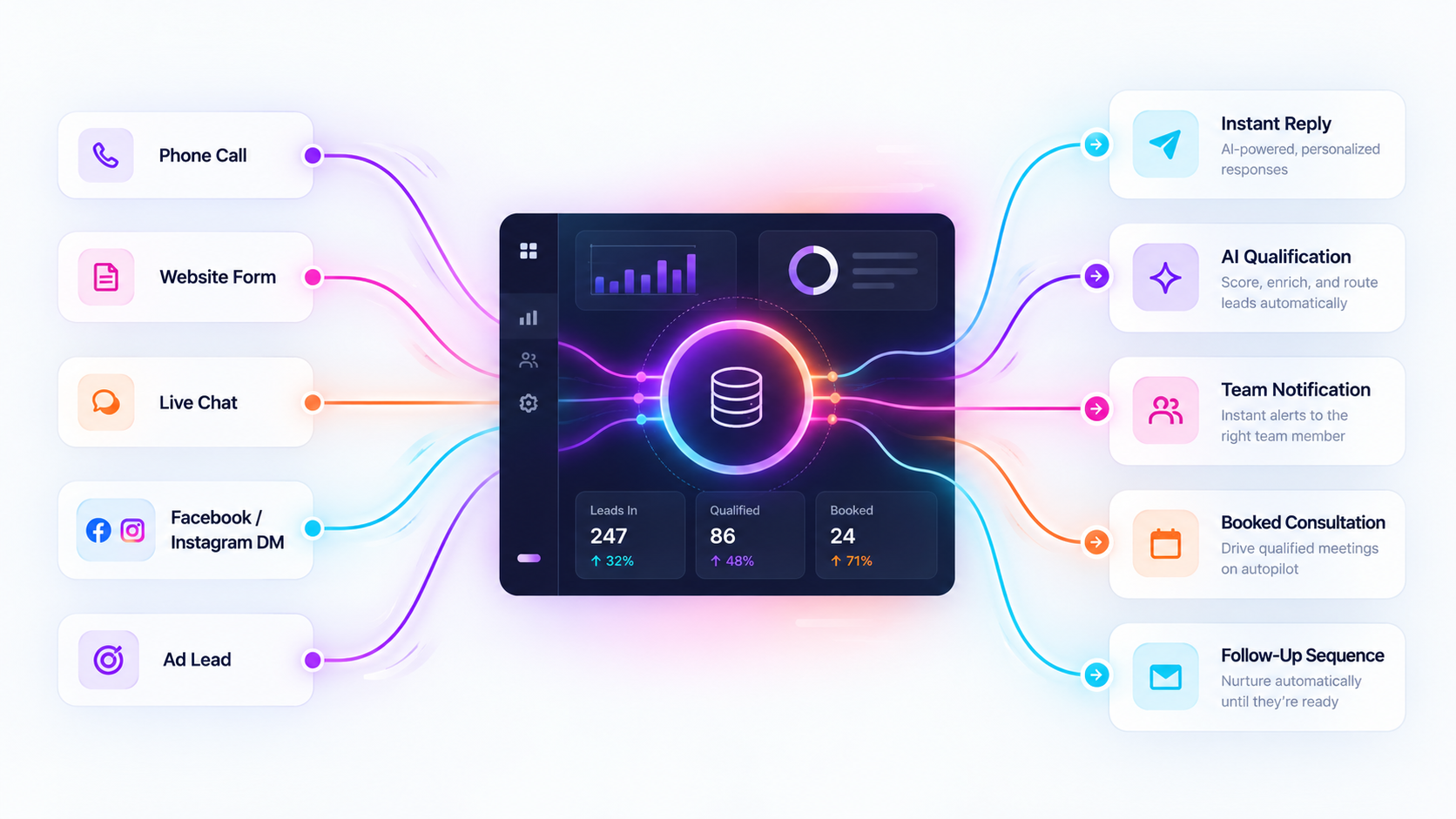
Each channel has its own clock and its own way of stopping it. This map shows the most common ways inquiries reach a service business, where response tends to break down, and the automation tools that close the gap. These are the same building blocks described on our service pages.
Channel | Where the clock starts | Common failure | What can stop the clock |
Phone | The phone rings | Nobody answers; the person hangs up with no voicemail | AI voice agent answers 24/7, qualifies and books; missed call text back as a safety net |
Website form | Form submitted | Sits in an inbox until someone checks | Instant automated email and message, owner alert, booking link |
Website chat | First message | Chat widget no one monitors | AI chatbot answers, qualifies and books, with human handoff |
Facebook / Instagram messages | DM received | Seen hours later by whoever manages the page | AI chatbot on Messenger and Instagram DMs, routed into your pipeline |
Paid ad lead | Lead form submitted | Exported in a batch, contacted days later | Lead flows straight into the pipeline and triggers the same instant follow-up |
Inbound message | Message received | Goes to one person's phone | Two-way messaging in one inbox, routed to your team or AI |
The common thread: each inquiry lands in one system and triggers an automated reply, and a human steps in when the conversation needs one. On our lead generation systems, hot leads trigger sales notifications, warm leads go into nurture, and cold leads go into long-term re-engagement, so nothing slips through.
A quick note on texting leads
Messaging is one of the quickest ways to respond to leads, and it's also regulated. In the U.S., rules such as the Telephone Consumer Protection Act (TCPA), along with carrier registration requirements for business messaging from standard local numbers (A2P 10DLC), govern how and when businesses can send automated messages to people. Get clear consent before sending them, include opt-out instructions, keep records of opt-ins, and have your setup reviewed by a qualified attorney before you launch. This note is general information, not legal advice.
Lead Routing vs. Speed to Lead: What's the Difference?
●Speed to lead is a result: how long someone waits before you respond.
●Lead routing is a process: the rules that decide which person or team gets each lead.
Good lead routing is one of the main ways to cut response time. If a lead goes to the wrong person, or to a shared inbox nobody owns, it waits no matter how fast your people are. Routing rules might send leads by service line, location or score, or to whoever is available right now. Routing alone isn't enough, though: a lead sent instantly to a sales rep who's on a job site for the next four hours still waits. That's why routing works best combined with instant automated replies and after-hours coverage, as part of a sales process built around the customer's timing.
Fast and Generic vs. Slower and Personal: Which Wins?
A fast response doesn't automatically mean a good customer experience.
An instant message saying "Thanks for contacting us. We'll get back to you soon" confirms that an inquiry was received, but it doesn't necessarily answer the customer's question or help them take the next step.
On the other hand, a thoughtful response that arrives hours later may reach someone who has already contacted another business.
The goal isn't to choose between speed and personalization. It's to use automation to deliver both.
An effective lead response process has two parts:
Immediate, relevant engagement. An automated response acknowledges the customer's specific inquiry, provides useful information when possible, and offers a clear next step, such as answering a question, scheduling an appointment, or requesting additional details.
Personalized follow-up. A team member or appropriately configured AI agent continues the conversation using the information already collected, reducing the need for customers to repeat themselves.
For example, instead of sending a generic confirmation after someone requests an estimate, an automated workflow could acknowledge the specific service requested, ask for relevant details, and explain when the customer can expect a response.
This makes automation more than a notification system. It becomes part of the customer experience.
The businesses that benefit most from speed-to-lead automation aren't simply responding first. They're making it easier for potential customers to get answers and move forward.
Frequently Asked Questions
What is the 5-minute rule for leads?
The "5-minute rule" is a widely repeated sales rule of thumb: try to respond to a new inbound lead within five minutes. It's a useful target because it forces you to automate the opening reply and monitor your speed, but it isn't a law. Your ideal response time depends on your industry, your channels and what your competitors do. Measure your current median first, then set a goal you can actually hit consistently.
How quickly should you respond to leads?
As quickly as you can do it well. An automated, useful acknowledgement can go out within seconds on almost any channel. For the first real conversation, aim for minutes during business hours, and use AI agents or missed-call follow-up so after-hours leads aren't left waiting until morning.
How much is speed to lead?
If you're asking what it's worth: it depends on your lead volume, conversion rate, and average job value, which is why measuring it matters. Compare how often quickly answered leads become customers with how often slowly answered ones do. If you're asking what it costs to fix: that depends on which channels you need to cover and which tools you already have. A tool like a shared inbox or a scheduling link helps, but the bigger gains come from connecting everything. A strategy session is the best way to scope it.
Does speed to lead matter for each channel equally?
Not equally. Phone and live chat are the most time-sensitive because the person is waiting right now. Quote requests and ad leads are close behind, since people often contact several companies at once. In a longer sales cycle with lots of research, you may have a little more room, but a quick, helpful acknowledgement still sets the tone.
Is speed to lead outdated now that AI can answer instantly?
No. AI raises the bar. When any business can respond in seconds, being fast is the minimum, and what sets you apart is whether that response is relevant, helpful, and followed by a real next step. AI makes speed achievable for small teams, but it doesn't replace a good process.
What is the difference between lead generation and speed to lead?
It's how you attract and capture new inquiries: ads, search, referrals, forms. Speed to lead is how fast you act on those inquiries once they arrive. Attracting plenty of leads and then replying slowly wastes the leads you've paid for, so the two work best as one system.
Where to Start
You don't have to rebuild everything at once. This week, do three things: run the audit (submit your own form, ring your office after hours, send your own DM), write down your current response time for each channel, and fix the single biggest gap, which for most service businesses is missed phone inquiries or after-hours forms.
If you'd rather have it built for you, Ideation Digital builds speed-to-lead systems in GoHighLevel: one CRM for all your inquiries, instant replies by email and message, AI voice and chat agents, smart routing, and follow-up that keeps going until the lead replies. See how our pipeline and workflow automation works, or book a free 30-minute strategy call and we'll walk through where your leads are waiting today.


